
Model your demand portfolio into the platform
This article explains what data you need to provide to Granular Energy to model your demand portfolio in the platform — specifically your customers, their contract periods, and the EAC (We use EAC - Energy Attribute Certificate - to describe all types of certificates including GOs, iRECs, REGOs, HKN, etc.) quality requirements they should receive.
What is this about?
Before the platform can run allocations or produce customer reports, it needs to know who your customers are, when their contracts run, and what kind of EACs they are entitled to receive. This is your demand portfolio definition.
The demand portfolio is built around two concepts: customers (or counterparties — the entities you are delivering EACs to on behalf of) and consumption meters (the metering points associated with each customer). Together, they tell the platform which customer should receive what type of EACs, and for how long.
This data is typically set up during onboarding and kept up to date as your customer base evolves. It is the foundation for everything downstream: allocation, EAC quality matching, and customer PDF reporting.
What data to provide
Customers
Each customer (counterparty) in your portfolio needs to be described with:
- Customer reference — your internal ID for this customer (e.g. from your CRM or billing system). This becomes the permanent identifier in the platform and cannot be changed after the first upload. (We can change it for you if you contact support though)
- Customer name — the display name that will appear in the platform and on customer-facing reports
- Customer country — ISO 2-letter country code (e.g.
DE,AT,NL)
Metering points and contract periods
Each customer is linked to one or more consumption meters. For each meter, you provide:
- Metering point reference — your internal ID for this meter (permanent key, often the same as the official grid/network ID)
- Metering point name (optional, deprecated) — a readable label
- Grid identifier — the official grid/network ID for the meter (optional but recommended for registry compliance)
- Contract start date (optional) — when the supply relationship for this customer/meter begins
- Contract end date (optional) — when it ends. Leave blank for ongoing contracts.
- Measurement granularity — the granularity at which consumption data will be provided for this meter (e.g. hourly, monthly, annual)
- Aggregation granularity — the granularity at which consumption data will be aggregated and represented in the platform for this meter (e.g. hourly, monthly, annual), it can be equal to the measurement granularity or coarser (e.g. measurement → hourly, aggregation → monthly)
A single customer can have multiple metering points (e.g. multiple sites), and a given meter can change customer assignment over time. The platform tracks this through metering point states — each state is one meter mapped to one customer for one contract period. When a contract ends and a new one begins, a new state is created.
This structure means you never lose historical contract data — the full assignment history of every meter is preserved in the platform.
💡 Align your portfolio structure with your CRM/Billing System. We strongly recommend that your portfolio structure, entity naming conventions, and any additional custom fields mirror those used in your internal CRM/Billing System as closely as possible.
This alignment makes it significantly easier to cross-reference data, reduces manual reconciliation effort, and lays the groundwork for automated data flows between your systems and the Granular platform in the future.
Grouping customers or metering points, or managing EACs on portfolio level
Granular Energy allows you to flexibly model hierarchies in a portfolio. For example if you zoom in, a customer can have one or several sites and each site one or several metering points. Zoom out, a customer can belong to a SuperCustomer (group of customers), several SuperCustomers can belong to a portfolio or tariff/product.
Below you can see an example hierarchy:
| Level | Example |
|---|---|
| Metering points | IKEA London Office Ground Floor, IKEA London First Floor/ 01985673292 (grid identifier, internal identifier, etc) |
| Sites | IKEA London, IKEA Liverpool |
| Customer | IKEA UK, IKEA France |
| SuperCustomer | IKEA Global, VW Global |
| Portfolio | Industrial & Commercial |
Your hierarchy can have as many or little levels as needed. There is no need to fill out every hierarchy level for every customer. Some customers/groups might be less complex than others and only require 1 level.
There is no need to upload data for each customer at each level. Some complex customers might require site level reporting, while for other parts of your customers might be bundled together at portfolio level with no customer level data available or required.
To determine the right amount of levels in your hierarchy ask yourself: how many different levels does it make sense to have from a reporting point of view? What level of reporting have I committed to deliver to my customers, and what level of reporting would I potentially like to be able to deliver to my customers in future?
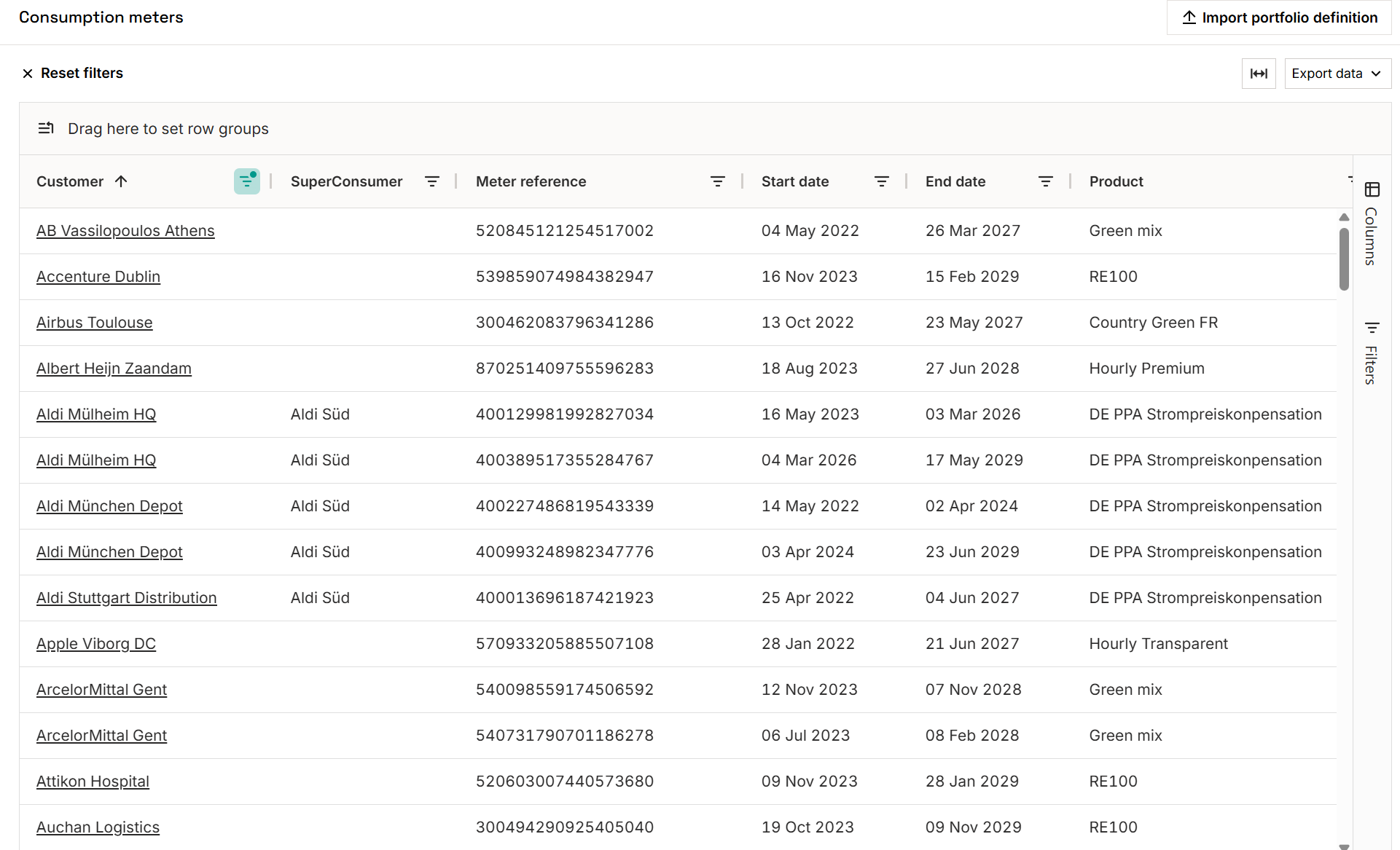
The image below shows an example of a simple portfolio definition:
How to upload
The demand portfolio is submitted as a CSV file via the platform's import interface or API. Each row in the file represents one metering point state — one meter assigned to one customer for one contract period, with its tag values.
Navigate to Portfolio → Consumption meters → Import a CSV (or via Import data → Portfolio data) and download the template directly from the UI for the exact column names and format.
Key fields in the file include customer and meter references, contract start/end dates, granularity settings, and one column per configured tag key.
Tips & things to know
- Reference fields are permanent. The
metering_point_referenceandconsumer_referencevalues are used as persistent keys throughout the platform. Choose references that are stable in your internal systems (e.g. your CRM ID, grid ID, or ERP code). - Untagged customers are fine. A customer without tags will receive EACs from whatever supply is available under your general allocation rules. Tags are only required when specific EAC quality matching is contractually needed.
- Getting the tag taxonomy right upfront matters. Discuss your product and tariff structure with Granular Energy before the first upload — this avoids rework later.
- For questions or support, contact support@granular-energy.com