
How allocations work
This article explains how allocations work in Granular Energy — what the Allocation Routine is, how your allocation algorithm is configured, and what different allocation scenarios look like in practice.
What is an allocation?
An allocation is the act of assigning supply volumes (certificates you hold or have contracted) to demand volumes (sell trades or retail supply contracts) in your portfolio. Allocations are the core of what Granular Energy does: they create a traceable, auditable link between a unit of green electricity generated and a unit consumed by a specific customer.
Allocations can express different quality requirements depending on your programs or products — for example, whether certificates need to match consumption on an hourly basis, come from a specific technology, or fall within a certain geography.
Online vs offline allocations
Granular supports two modes of allocation:
Online (in-platform) — Running the allocation routine or doing an allocation via the interactive allocation flow. We recommend to use this for relatively simple requirements.
Offline — Running the allocation routine offline and loading the results into the platform. The results appear in the platform identically to online runs — in Allocation History and Allocated Volumes. This is the method used for the most complex cases. We plan to move more and more of the complex methods to the online flow. If you have a type of routine that you particularly need to have run online, contact our support team.
Allocation algorithm
The allocation algorithm at the heart of the Granular Energy platform is built around the concept of a routine — an ordered sequence of allocation steps that collectively encode how a given organisation wants to match its supply against demand. Each step is independently scoped, targeting specific subsets of supply and demand volumes through a combination of filters (by asset, technology, counterparty, tags, deal attributes, time period, and more), and can express quantities as absolute volumes, proportions, or fractions of unallocated volumes.
Steps run sequentially and are additive by design: each one tops up allocations toward the required level rather than overwriting what came before, and a step is treated as a no-op if its requirements are already satisfied. Two core allocation methods are available — as-produced and as-consumed. The routine is configurable per organisation and can be viewed in the Allocation Routine page, where users can inspect each step, understand its parameters and scope, and trigger a run over a defined time period — giving portfolio managers both the transparency and the control they need over a process that previously required significant manual effort or offline scripting.
Allocation rules
Each step in the routine uses one of the following rules:
As-produced — Supply volumes are allocated proportionally to supply, regardless of what the exact demand being allocated to. This is great for capturing as-produced PPAs, for example: allocate either 100% of an asset’s output to demand, or a set percentage or maximum volume.
As-consumed — Supply is matched to demand within a specific time window (e.g. hourly). This method respects temporal matching: certificates generated in a given hour are matched to customers' consumption in that same hour. As-consumed is required for hourly matching programs such as EnergyTag.
Custom — For complex scenarios that require bespoke logic (e.g. optimisation objectives, battery storage, multi-program priority ordering), a custom allocation algorithm is configured internally.
The Allocation Routine
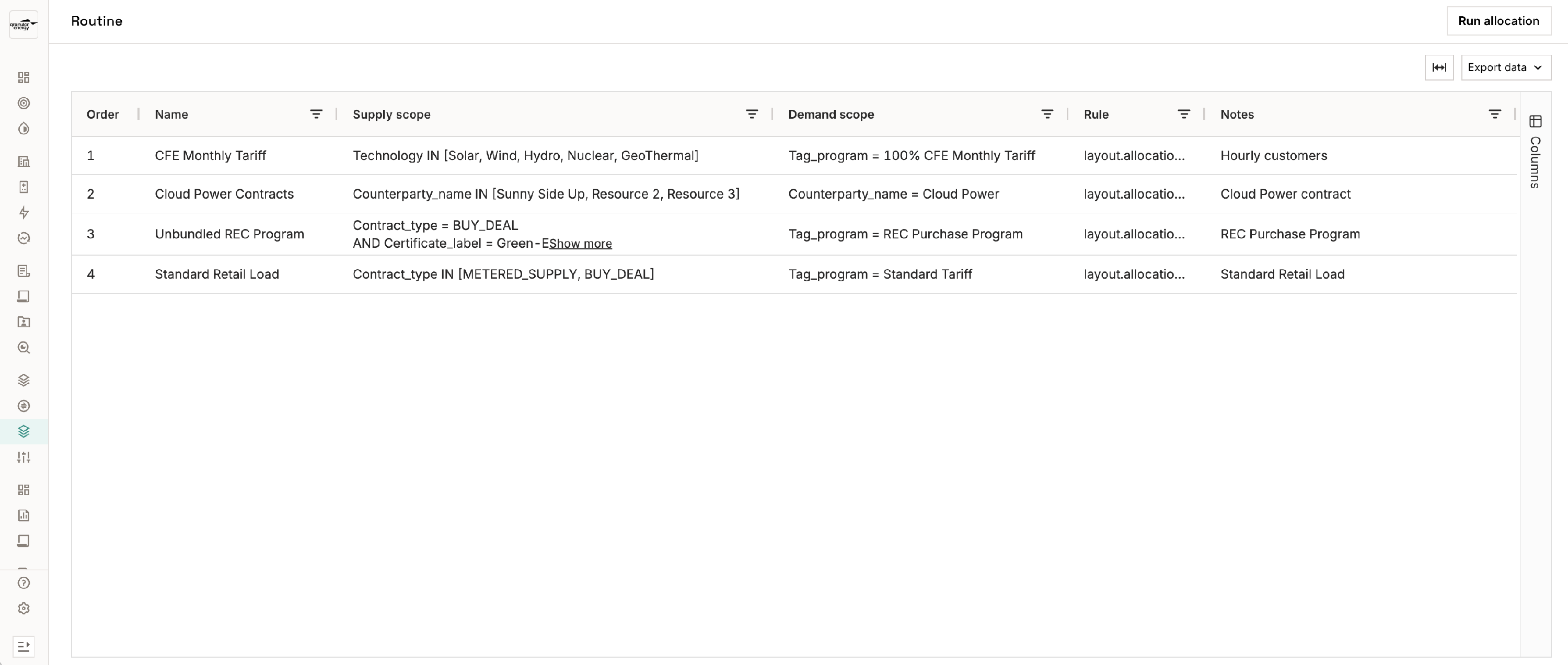
The Allocation Routine is the sequence of steps that defines how the allocations run for your portfolio. It is configured by Granular Energy at onboarding, tailored to your specific contractual setup and programme requirements.
You can view your routine at Allocation > Routine. Each step in the routine shows:
- The order the steps run in descending order
- The name of the step (e.g. "RE100 — Wind & Solar", "Hourly EnergyTag step")
- The allocation method used for the step
- The supply and demand scope — which supply and demand volumes this step applies to (filtered by technology, counterparty, tags, deal type, etc.)
- An optional description of what the step does
Allocation scenarios: examples
The routine is flexible enough to represent a wide range of green energy programs. Below are examples of common scenarios and how they are typically modelled.
RE100: A simple as-consumed or as-produced allocation at monthly or annual granularity. Certificates from any RE100 compliant assets can be matched to any customer consumption (<15 years old, wind or solar). The routine typically runs a single step covering all supply and demand in the portfolio.
TÜV Nord / EKO Energy / Grüner Strom Label: These programs have specific requirements around certificate origin, technology, or locality. The routine uses supply-side filters to restrict each allocation step to the qualifying technologies or subsidy regimes (e.g. solar only, no subsidy). Multiple steps may be needed if the portfolio includes a mix of qualifying and non-qualifying supply.
EnergyTag (hourly matching): An as-consumed allocation at hourly temporal grouping, with matching resolution set to hourly. Each step matches certificates to consumption within the same hour. Supply and demand grouping levels are typically set at the counterparty level to ensure consistent hourly coverage across a customer's sites. This is the most granular matching scenario currently supported.
Sleeved PPA (as-produced): When a customer has a direct PPA arrangement with a specific generator, the routine includes a dedicated step that allocates that generator's production to that customer first — before any remaining supply is distributed more broadly. Supply scope is filtered to the specific asset; demand scope is filtered to the relevant counterparty.
AIB-only / any grid-connected: Supply scope is filtered to certificates from AIB member registries (or optionally any grid-connected source). Useful for EU corporate programs where registry origin matters. A single step with an appropriate supply filter covers this case.
Battery storage: Batteries introduce a time shift: generation from one period charges a battery that discharges into a different period. This requires custom allocation logic to handle the charge/discharge relationship between supply and demand periods. Currently handled offline by TS.
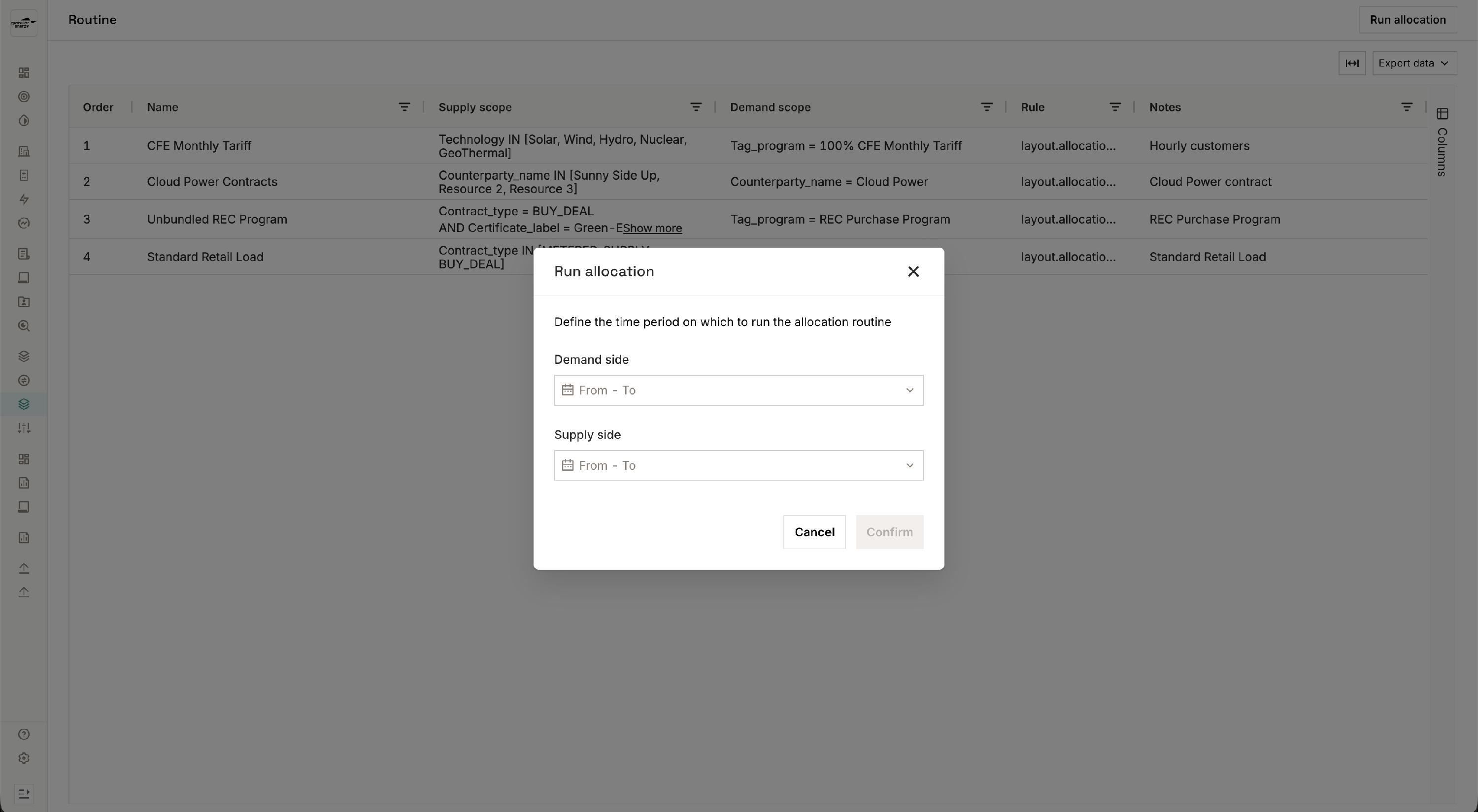
Running your routine
- Go to Allocation > Routine.
- Confirm the period onver which to run the allocation routine (supply period and demand period).
- Click Run.
- The platform executes steps sequentially.
- Once complete, the run appears in Allocation > History and results are visible in Allocation > Allocated Volumes.
Runs are additive — each run tops up existing allocations to the level required by each step. If a step's requirements are already met from a previous run, that step is skipped automatically. If one step fails, the entire run will fail and nothing will be allocated. You can view the run details at History > Run details.
If you need to substantially change your allocations (not just top up), existing allocations must be deleted before rerunning. Contact Granular Energy Technical Solutions if you need support.
Tips & things to know
- Your routine is set up by Granular at onboarding and is not currently editable directly in the UI. If your portfolio or programs change, contact us to update the routine configuration.
- Each run is recorded. You can review the history of all allocation runs and download allocation details.
- Offline runs appear the same as online runs in the platform — they show up in history and allocated volumes identically. The distinction is in how they were processed.
- Allocation runs are idempotent — running the routine multiple times will not double-allocate. Steps that are already satisfied are skipped.
- Each allocation step of a routine is independent: a failure in one step will cause the whole run to fail, and no new allocations from that run will be saved.
- For questions about your specific routine or to request changes, reach out to Granular Energy Technical Solutions team.